Pressure Altitude Calculator
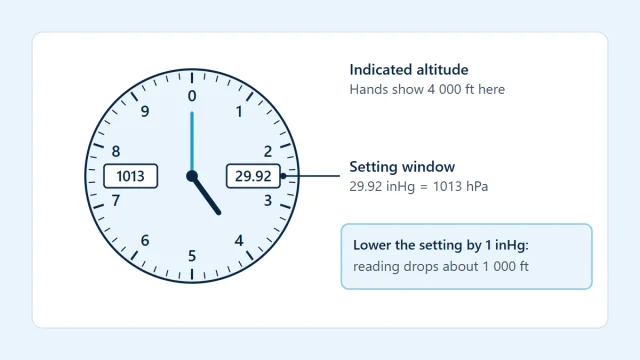
Pressure altitude is the height an altimeter shows when its setting window reads 29.92 inHg (1013.25 hPa). It is altitude measured against a fixed pressure datum instead of against today's sea-level pressure, which makes it the common scale for flight levels and for the altitude axis on performance charts. This calculator takes an elevation or an indicated altitude together with the current altimeter setting and returns the pressure altitude using the standard-atmosphere relation.
On a day of low pressure the result is higher than the elevation; on a day of high pressure it is lower. Seeing the size of that shift, and how it compares with the familiar mental shortcut, is the point of the page.
How to use this calculator
- Enter Elevation or indicated altitude in feet or meters.
- Enter the current Altimeter setting and select the unit it was reported in, inHg or hPa.
- Read the pressure altitude, the rule-of-thumb estimate and the standard pressure at that altitude.
The first field accepts either a field elevation, for a pressure altitude on the ground, or the altitude an altimeter is indicating in flight on the setting you enter. The setting must be between 850 and 1100 hPa (about 25.10 to 32.48 inHg). Check the unit selector before typing: a value such as 29.42 belongs with inHg and a value such as 996 with hPa. To move a setting between the two units, use the altimeter pressure conversion calculator.
Formula
PA = elevation + 145 442.16 × [ 1 − (setting ÷ 1013.25)^0.190263 ]
rule of thumb: PA ≈ elevation + (29.92 − setting in inHg) × 1 000
What the variables mean
- PA
- pressure altitude in feet, the altitude shown with 29.92 inHg / 1013.25 hPa set
- elevation
- field elevation or indicated altitude in feet
- setting
- altimeter setting (QNH), in hPa in the exact formula
Worked example
These example values are illustrative round numbers, not data for any particular aircraft. Select "Fill in the example" in the calculator to load them.
Inputs
- Elevation or indicated altitude: 2500 ft
- Altimeter setting: 29.42 inHg
Working
- Altimeter setting = 996.28 hPa (29.42 inHg).
- Correction = 145 442.16 × [1 − (996.28 ÷ 1013.25)^0.190263] = 467 ft.
- PA = 2,500 + (467) = 2,967 ft.
Result
- Pressure altitude: 2,967 ft (904 m)
- Rule-of-thumb estimate: 3,000 ft (1 000 ft per inHg away from 29.92)
- Standard pressure at that altitude: 909.2 hPa (26.85 inHg)
Reading the result
Pressure altitude is the exact result, in feet with meters beside it. Rule-of-thumb estimate uses 1,000 ft for each inch of mercury the setting differs from 29.92; it is an approximation, usually within a few tens of feet near sea level for ordinary settings, and is shown so you can judge the shortcut against the formula. Standard pressure at that altitude is the pressure, in hPa and inHg, that the standard atmosphere has at the computed pressure altitude. A setting above standard gives a pressure altitude below the elevation, and a setting below standard gives one above it.
Assumptions and limitations
- The relation between pressure and height is that of the standard atmosphere, with its fixed sea-level temperature and lapse rate.
- The altimeter setting is assumed to be current and valid for the place where the elevation or indicated altitude applies.
- The altimeter is assumed to be free of instrument error; no correction is made for an individual instrument.
- Air temperature is not an input, so the result says nothing about true height above the ground on a cold or hot day.
- Entering exactly 29.92 inHg leaves a difference of about 1 ft, because the standard setting is 29.9213 inHg when written in full.
- The 1,000 ft per inHg shortcut is linear, while the real relationship is curved, so the two rows drift apart at high elevations and extreme settings.
Common mistakes
- Applying the correction with the wrong sign, lowering the altitude when the setting is below standard.
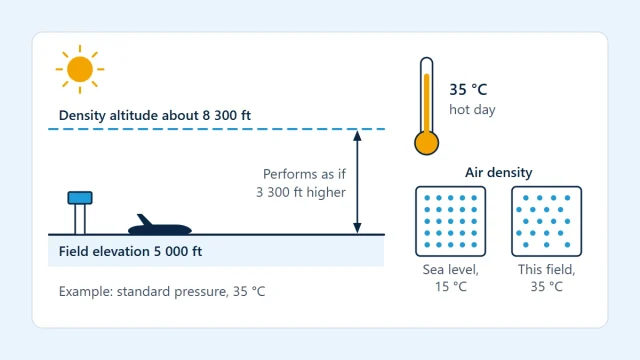
- Confusing pressure altitude with density altitude, which also needs temperature.
- Entering the station pressure measured at the field instead of the altimeter setting.
- Using roughly 30 ft per hPa as if it held at all altitudes, when the figure grows as the air thins.
- Selecting inHg and typing a value in hPa, which the range check will reject.
- Treating pressure altitude as height above terrain or as true altitude above sea level.
References
- Federal Aviation Administration, Pilot's Handbook of Aeronautical Knowledge (FAA-H-8083-25).
- U.S. National Weather Service, Pressure Altitude Calculator (formulas).
- NOAA, NASA and the U.S. Air Force, U.S. Standard Atmosphere, 1976.
These public sources explain the formulas and definitions used here. Citing them does not mean they have reviewed, endorsed or certified AviationCalc.
Related calculators
Density Altitude Calculator
Density altitude from field elevation, altimeter setting and outside air temperature (dry air).
Atmosphere and Altitude
Altimeter Pressure Conversion Calculator
Convert altimeter settings between inHg, hPa (millibars), mmHg, kPa and psi.
Atmosphere and Altitude
Standard Atmosphere Calculator
ISA temperature, pressure, density and speed of sound at any altitude up to 20 km.
Atmosphere and Altitude
True Airspeed Calculator
Convert calibrated airspeed to true airspeed from pressure altitude and outside air temperature.
Flight Speed and Distance
Guides that explain this calculation

Atmosphere and Altitude
Understanding Pressure Altitude
Pressure altitude is altitude measured from the 1013.25 hPa (29.92 inHg) standard datum. Learn how to read it, calculate it and where it is used.
Atmosphere and Altitude
Aviation Altimeter Settings Explained
How an altimeter setting works, what QNH and the standard setting show, how inHg and hPa convert, and what a wrong setting does to indicated altitude.
Atmosphere and Altitude
What Is Density Altitude?
Density altitude is pressure altitude corrected for non-standard temperature. See the exact formula, the 120 ft per °C shortcut and a worked example.